domingo, 25 de dezembro de 2016

Bios Repair Course + Bios programmer + 3.4GB Bios files


Bios Master Course... + Bios Programmer (Offer) + 3.4GB bios files (Offer)

December 26th we will start a new class on Bios repair
Come and learn how to master a Bios... and you will never need to search for bios again
1- Preparation and Bios Edition (support programs and methods)
2- Preparation and Bios Edition (Decompression and Bios Region)
3- SIO Bios and the PCH Bios
4- ME Region (Intel) and manipulating the BIOS files
5- Bios Dell (Unpacking and Decryption)
6- Bios Asus (Structure, Unpacking and Handling) Part 1
7- Bios Asus (Structure, Unpacking and Handling) Part 2
8- Advanced Decompression Method (Update Bios)
9- HP Bios (Structure, Unpacking and Handling)
10- Bios HP direct data injection in the Bios (Product ID, Serial Number)

All students will have 5 weeks technical support


Offer Bios programmer + 3.4GB Bios files Including Samsung, Asus and Apple

Bios Repair Course + Bios Programmer + 3.4GB bios files only 75Euros
Payment on Paypal, WesternUnion or MoneyGram

domingo, 13 de novembro de 2016

Dell Bios

How to download a Dell bios from Dells website without going to Dells website.
1º Make bios course with Mr Fitty Paudi
2º Backup original bios from computer
3º On original bios from computer look for laptop model and bios version (ex: inspiron3443 bios version A08)
4ºUse this link as a master link "http://downloads.dell.com/bios/",
5º With bios course completed and all the previous information just use in the following way:
- Use master link
- Use bios information
- http://downloads.dell.com/bios/3440_A08.exe
6º Don´t forget the termination .exe

Very very very simple to download directly from Dells server without going to Dell website
In the photo the link would be:
http://downloads.dell.com/bios/M1330A15.exe

In this case the link will be "downloads.dell.com/bios/N4030A07.exe"

Join Bios Repair Course and become a master on Bios Repair


Acer Bios

How to easily find any Acer Bios?
1º Make bios course with Mr Claudio Silva
2º Backup original bios from computer (always needed)
3º On original bios from computer look for bios version
(ex: V1.13)
4ºUse this link as a master link "http://www.driverfilesdownload.com/…/BIOS_Acer_2.18_A_A.zi…/",
5º With bios course completed and all the previous information just use in the following way:
- Use master link
- Use bios information and change de bios version on master link
(BIOS_Acer_1.13_A_A.zip)
- http://www.driverfilesdownload.com/…/BIOS_Acer_1.13_A_A.zip…
6º Copy the real link information and past on the web browser and the correct file will be downloaded
Very very very simple
In the photo the link would be:
http://global-download.acer.com/…/B…/BIOS_Acer_1.13_A_A.zip…


LG Bios Decrypt

Bios from LG Website, very very very easy to extract.


Bios Repair Course Join Us and Become a Master on Bios Repair

CQ40-713BR No Power Issue

CQ40-713BR No Power Issue

Join our Laptop Repair Course

HP DV6 no Power

HP DV6 no Power
Join us Next laptop Repair Course

How does LDO voltage work?

How does LDO voltage work?
For this signal we need to measure 4 pins:
LDOREFIN (Low Drop Out Reference Input)
EN_LDO (Enable Low Drop Out)
LDO (Low Drop Out)
BYP (Bypass)

The first signal to consider it is LDOREFIN, this is an input pin responsible for program the output voltage on LDO, when this signal id conected to GND (0v) the output pin LDO will have 5v.
When this signal is connected to a 5v power supply, the output pin LDO will have 3v.
The second signal to is EN_LDO, this is an input pin and i will not extend the explanation of the voltage that will this pin because it depends on motherboard architecture, this signal is LDO Enable Input. The LDO is enabled if EN_LDO is within logic high level and disabled if EN_LDO is less than the
logic low level
The third signal to consider is LDO itself, this is an output signal, this output pin will be 5v if the LDOREFIN it´s connected to GND, and this output pin will be 3v if the LDOREFIN it´s connected to 5v.
The fourth signal to consider is BYP, the name says it all Bypass, this pin will bypass trough 5v and 3v on LDO. If LDOREFIN is connected to GND this pin will be connected to 5v (as showed on picture), if LDOREFIN is connected to 5v this pin will be connected to 3v.


terça-feira, 11 de outubro de 2016

Bios Repair Course

Bios Repair Course

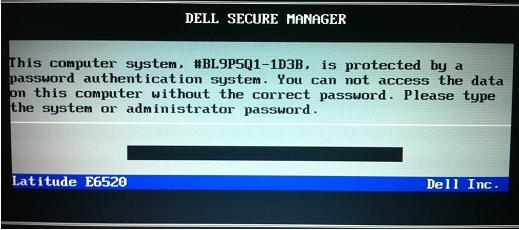
Aren´t you tired of those sharks asking for money every time you need a Dell Administrative Password 1D3B / 1F66 / 1F5A / 3A5B? 
Join our bios repair course and receive the full software to unlock your password.
Learn step by step with video tutorial how to remove manually or by software

Level 1 (Price 75euro)
Lesson 1 - Preparing Bios part 1
Lesson 2 - Preparing Bios part 2
Lesson 3 - Main Bios and KBC Bios
Lesson 4 - ME Region / Manufacturer Bios smaller than the backup Bios
Lesson 5 - Dell Bios Decoding / Manufacturer Bios bigger than the backup Bios
Lesson 6 - Introduction to Asus Bios
Lesson 7 - Asus Bios Decoding
Lesson 8 - Advanced Method of Decrypt
Lesson 9 - Introduction to HP Bios
Lesson 10 - HP Bios Serial Number manually and using DMI Tools

Level 2 (Price 75euro)
Lesson 1 - Lenovo Bios decoding
Lesson 2 - Apple Bios single serial and Dual serial
Lesson 3 - HP Bios/ ME Region Rebuild / Panasonic Bios Decoding
Lesson 4 - HP Bios using 2016 Encryption / Windows 8 Activation Key / Computer serial Number
Lesson 5 - Apple Password removal / LG bios decoding / Dell Password Removal

Become a MASTER on Bios Repair


Payment on Western Union, MoneyGram or Paypal


domingo, 14 de agosto de 2016

Mini Bios Programmer


 Mini Bios Programmer only for 15€
 
Currently the EEPROM 24xx, 25xx, Flash 25xx, are being widely used in the world of 
computer repair.
Often the technicians can not repair the bios because BIOS programmers are very expensive 
and the technician can not afford to buy.
Mini Bios programmer is your solution, if you want to only program 
Bios Laptop and Desktop this is your solution for only 15 euros  you can get your 
Bios programmer and start repairing bios.


Programmer features:
1- Burning faster than ordinary ATMEGA8 do 25xx Series Programmer 
2-3 times faster. Erase the programming speed is 
probably 2-3Mbit check every minute . Very suitable for amateur 
programmer 24 and 25 series FLASH.

2-Support WIN98, WINME, WIN2K, WINXP, VISTA, WIN7-32 bits, etc.
operating systems.
3-Use the USB port power supply
 
Programmer list of supported chips :

AMIC:
·A25L05P, A25L10P, A25L20P, A25L40P, A25L80P, A25L16P

ATMEL:
·AT25DF041A, AT25DF321, AT25F004, AT25F512A, AT25F2048, AT25F4096, AT25F1024A, AT25FS010, AT25FS040, AT26DF081A, AT26DF161A, AT26DF321, AT26F004

EON:
·EN25B05, EN25P05, EN25B10, EN25P10, EN25BF20, EN25P20, EN25F20, EN25B40, EN25P40, EN25F40, EN25B80, · EN25P80, EN25F80, EN25T80, EN25B16, EN25P16, EN25B32, EN25P32, EN25B64, EN25P64

Excel Semiconductor Inc.
·ES25P10, ES25P20, ES25P40?? ES25P80, ES25P16, ES25P32

ST:
·M25P05A, M25P10A, M25P20, M25P40, M25P80, M25P16, M25P32, M25P64, M25PE10, M25PE20, M25PE40, M25PE80, M25PE16, M25PE32, M45PE10, M45PE20, M45PE40, M45PE80, M45PE16, M45PE32

MXIC:
·MX25L512, MX25L1005, MX25L2005, MX25L4005, MX25L8005, MX25L1605, MX25L3205, MX25L6405
MX25L6445, MX25L6405 (SOP16)

NexFlash:
·NX25P80, NX25P16, NX25P32

Chingis Technology Corporation
·Pm25LV512, Pm25LV010, Pm25LV020, Pm25LV040, Pm25LV080, Pm25LV016, Pm25LV032, Pm25LV064

Saifun Semiconductors
·SA25F005, SA25F010, SA25F020, SA25F040, SA25F080, SA25F160, SA25F320,

WINBOND
·W25P10, W25X10, W25Q10, W25P20, W25X20, W25Q20, W25P40, W25X40, W25Q40, W25P80, W25X80, W25Q80, W25P16?? W25X16, W25Q16, W25P32, W25X32, W25Q32, W25P64, W25X64, W25Q64

quinta-feira, 5 de novembro de 2015

Bios Recovery and Repair Course

​​​Bios Recovery and Repair Course Level 1


With the increase innovation of computer technology, Bios has become an indispensable element in Motherboards.

Bios today is much more than just control the time and hardware peripherals on the Motherboard, IT MANAGES THE BOARD POWER SYSTEM.


​​
Technicians working in computer maintenance, know that these days it is very common to find defects in the Bios. The most common defect are turn on the notebook and no image, sometimes the Motherboard does not power on.


Computers from the 2nd, 3rd and 4th generation we no longer find the original Bios on the manufacturer's site, and even when it is available often comes with different size of the original Bios.

With this course the student will know how to repair the BIOS file, the student backs up the original BIOS fixes and flash it back in the IC.

Without having to depend time on forums, without having to waste time waiting for someone that has the Bios.


You know that hard Bios that nobody has ??? Do not despair !!!

Be the person who has all Bios because you know repair damaged BIOS.


Course Level 1 (1 hour each lesson, step by step)
Lesson 1- Preparation and Bios Edition (support programs and methods)
Lesson 2- Preparation and Bios Edition (Decompression and Bios Region)
Lesson 3- KBC Bios and the PCH Bios
Lesson 4- ME Region (Intel) and manipulating the BIOS files
Lesson 5- Bios Dell (Unpacking and Decryption)
Lesson 6- Bios Asus (Structure, Unpacking and Handling) Part 1
Lesson 7- Bios Asus (Structure, Unpacking and Handling) Part 2
Lesson 8- Advanced Decompression Method (Update Bios)
Lesson 9- HP Bios (Structure, Unpacking and Handling)
Lesson 10- Bios HP direct data injection in the Bios (Product ID, Serial Number)

All students will have 5 weeks technical support and a certificate at the end of 10 lessons.


Best regards
Eloy - Motherboards

quinta-feira, 27 de agosto de 2015

Curso Eletrónica de Laptops em Angola

Curso Eletrónica de Laptops em Angola
 
Cansado de perder os clientes para a concorrência?

​​​​​​​​
Cansado e farto de perder dinheiro para a concorrência?
​​​O seu maior inimigo não é a crise, mas sim a concorrência.
Vença a concorrência, e vencerá a crise.

No próximo dia 31 de Agosto de 2015 daremos inicio a nova turma do Curso de Eletrónica de Laptops "Consertar Laptop que não liga".


Não deixe de fazer parte da turma e esteja um passo a frente da concorrência.

No curso iremos ensinar a fazer:
Correcta Análise do Esquema, Sinais, Tensões e dos Componentes.

Não perca esta oportunidade de fazer crescer a media dos seus reparos.

Conteúdo Programático:

1º Diagrama em Blocos do Notebook (Explicação das páginas do esquema)

2º Circuito Entrada e Circuito Charge (Tensões e Sinais)

3º Circuito 3.3VALWP e 5VALWP (Tensões, Sinais e PWM)

4º S/IO e BIOS (Sectores do S/IO, Reset Manual da Bios)

5º Circuito 1.8v e 1.5v (Conversores Buck e Reguladores de Tensão simples)

6º Circuito VRM (Circuito Regulador do CPU)

7º Circuito Power ON / Portas Lógicas / Botão Power (Entradas e Saídas Digitais e Analógicas)

8º Restantes fontes da placa (fontes secundárias)

9º Circuito Gerador de Clock / Cristal (Sinais Especiais)

10º Sequência de Start da placa (Resumo das aulas anteriores)

Ministrado ao vivo as terças feiras e quintas feiras as 21hrs


Entre em contacto connosco AGORA e saiba como fazer fazer parte da turma.
eloymotherboards.angola@gmail.com

Atenciosamente
Eloy - Motherboards Angola

quarta-feira, 19 de agosto de 2015

Livro Recuperação de Dados de HD

Livro Recuperação de Dados de HD

Ola caros amigos e seguidores do nosso trabalho.
Estamos com mais um projeto em mãos, e desta vez é o livro de recuperação de dados dos HD´s danificados.

Gostaríamos de saber a vossa opinião em relação ao livro.
Deixem os vossos comentários, para sabermos a vossa opinião.

Abraço
Claudio Silva
Presidente e fundador da empresa
Eloy - Motherboards

quinta-feira, 6 de agosto de 2015

Curso Electrónica do Notebooks Dia 24 de Agosto

Curso Eletrónica do Notebooks Dia 24 de Agosto de 2015
Cansado de perder os clientes para a concorrência?

​​
Cansado e farto de perder dinheiro para a concorrência?


O seu maior inimigo não é a crise, mas sim a concorrência.
Vença a concorrência, e vencerá a crise.No próximo dia 24 de Agosto de 2015 daremos inicio a nova turma do Curso Avançado de Especialização em Notebooks "Notebook não liga".

Não deixe de fazer parte da próxima turma e esteja um passo a frente da concorrência, o curso é Online mas também temos o modelo Offline para os alunos que não possam assistir as aulas.

No curso iremos ensinar a fazer:
Correcta Análise do Esquema, Sinais, Tensões e dos Componentes.

Não perca esta oportunidade de fazer crescer a media dos seus reparos.

Conteúdo Programático:

1º Diagrama em Blocos do Notebook (Explicação das páginas do esquema)

2º Circuito Entrada e Circuito Charge (Tensões e Sinais)

3º Circuito 3.3VALWP e 5VALWP (Tensões, Sinais e PWM)

4º S/IO e BIOS (Sectores do S/IO, Reset Manual da Bios)

5º Circuito 1.8v e 1.5v (Conversores Buck e Reguladores de Tensão simples)

6º Circuito VRM (Circuito Regulador do CPU)

7º Circuito Power ON / Portas Lógicas / Botão Power (Entradas e Saídas Digitais e Analógicas)

8º Restantes fontes da placa (fontes secundárias)

9º Circuito Gerador de Clock / Cristal (Sinais Especiais)

10º Sequência de Start da placa (Resumo das aulas anteriores)


Ministrado ao vivo as segundas e quintas feiras as 21hrs
Atenciosamente
Jorge Correia
Eloy - Motherboards